
Tagged: sensor
-
AuthorPosts
-
June 21, 2020 at 4:08 PM #15488
Christian Eugster
ParticipantHi after looking for a solution to my problem, I found this line in th mini ultra pro v3 section:
Data logging with Mini Ultra Pro Coming Soon
so I have to ask here how I solve my problem: I tried with two sensors on the pins GND, 3V3, SDA, SCL to read sensor data without luck. Do you have a solution for this (what am I doing wrong)?/******************************************************************************* Mini Ultra Pro Sleep RTC Alarm Version: 0.10 Date: 20-02-2017 Company: Rocket Scream Electronics Author: Lim Phang Moh Website: www.rocketscream.com An example code demonstrating the ultra low sleep current capability of the Mini Ultra Pro while running the on-chip built-in RTC. Example puts the Mini Ultra Pro into standby mode (sleep) while RTC is allowed to run in the background. Alarm is set to wake the processor on the 15 s of a minute. This results in sleep period of 1 minute. The LED on pin 13 is set to toggle on every alarm match state. In sleep state with the built-in LED turn off, current measured is approximately 21.0 uA. Requirement: 1. Mini Ultra Pro board powered by a single cell Li-Ion/Pol 3.7V battery. Important Note: 1. Upon using the SerialFlash.sleep() function, the only function that the serial flash chip response to is SerialFlash.wakeup(). Revision Description ======== =========== 0.10 Initial public release. *******************************************************************************/ #include <SerialFlash.h> #include <RTCZero.h> #include <SPI.h> #include <RH_RF95.h> #include <RHDatagram.h> #include <CayenneLPP.h> #define DEBUG #define SERVER_ADDR 1 #define NODE_ADDR 32 #define SENSOR_SI7021 //#define SENSOR_SHT31 #define RF_FREQUENCY 868.0 #define Serial SerialUSB // ***** CONSTANTS ***** const int radioDio0 = 2; const int flashChipSelect = 4; const int radioChipSelect = 5; // Choose correct on-board radio RH_RF95 radio(radioChipSelect, radioDio0); RHDatagram manager(radio, NODE_ADDR); RTCZero rtc; CayenneLPP lpp(51); #ifdef SENSOR_SI7021 #include <Adafruit_Si7021.h> Adafruit_Si7021 si7021 = Adafruit_Si7021(); #elif defined SENSOR_SHT31 #include <Adafruit_SHT31.h> Adafruit_SHT31 sht31 = Adafruit_SHT31(); #endif /* Change these values to set the current initial time */ const byte seconds = 0; const byte minutes = 00; const byte hours = 10; /* Change these values to set the current initial date */ const byte day = 20; const byte month = 2; const byte year = 17; // ***** VARIABLES ***** #if defined SENSOR_SI7021 || defined SENSOR_SHT31 float tmp; float hum; #endif bool match = false; unsigned char pinNumber; float bat; float readVoltage() { int adcReading = analogRead(A5); // Discard inaccurate 1st reading adcReading = 0; // Perform averaging for (unsigned char counter = 10; counter > 0; counter--) { adcReading += analogRead(A5); } adcReading = adcReading / 10; // Convert to volts and return value return adcReading * (4.3 / 1023.0); } void alarmMatch() { match = true; //#ifdef DEBUG // Serial.println("Alarm callback"); //#endif } #ifdef SENSOR_SI7021 void init_si7021() { #ifdef DEBUG SerialUSB.print("Initializing sensor Si7021: "); #endif if (si7021.begin()) { #ifdef DEBUG SerialUSB.println("OK"); #endif } else { #ifdef DEBUG SerialUSB.println("Failed"); #endif } } #endif #ifdef SENSOR_SHT31 void init_sht31() { #ifdef DEBUG SerialUSB.print("Initializing sensor SHT31: "); #endif if (sht31.begin(0x44)) { #ifdef DEBUG SerialUSB.println("OK"); #endif } else { #ifdef DEBUG SerialUSB.println("Failed"); #endif } } #endif #ifdef SENSOR_SI7021 void read_si7021() { tmp = si7021.readTemperature(); lpp.addTemperature(1, tmp); #ifdef DEBUG if (isnan(tmp)) tmp = 20.0; SerialUSB.print("Temperature: "); SerialUSB.print(tmp); SerialUSB.println("ºC"); #endif hum = si7021.readHumidity(); lpp.addRelativeHumidity(2, hum); #ifdef DEBUG if (isnan(hum)) hum = 50.0; SerialUSB.print("Humidity: "); SerialUSB.print(hum); SerialUSB.println("%"); #endif } #endif #ifdef SENSOR_SHT31 void read_sht31() { tmp = sht31.readTemperature(); lpp.addTemperature(1, tmp); #ifdef DEBUG if (isnan(tmp)) tmp = 20.0; SerialUSB.print("Temperature: "); SerialUSB.print(tmp); SerialUSB.println("ºC"); #endif hum = sht31.readHumidity(); lpp.addRelativeHumidity(2, hum); #ifdef DEBUG if (isnan(hum)) hum = 50.0; SerialUSB.print("Humidity: "); SerialUSB.print(hum); SerialUSB.println("%"); #endif } #endif void setup() { #ifdef DEBUG SerialUSB.begin(9600); delay(10000); SerialUSB.println("Started"); SerialUSB.println("Initializing board"); #endif // Switch unused pins as input and enabled built-in pullup for (pinNumber = 0; pinNumber < 23; pinNumber++) { pinMode(pinNumber, INPUT_PULLUP); } for (pinNumber = 32; pinNumber < 42; pinNumber++) { pinMode(pinNumber, INPUT_PULLUP); } pinMode(25, INPUT_PULLUP); pinMode(26, INPUT_PULLUP); #ifdef DEBUG SerialUSB.print("Initializing radio: "); #endif if (radio.init()) { #ifdef DEBUG SerialUSB.println("OK"); #endif } else { #ifdef DEBUG SerialUSB.println("Failed"); #endif } radio.setFrequency(RF_FREQUENCY); radio.setModeTx(); radio.setTxPower(14, false); // values between 5 to 23 manager.setThisAddress(NODE_ADDR); manager.setHeaderFrom(NODE_ADDR); radio.sleep(); SerialFlash.begin(flashChipSelect); SerialFlash.sleep(); #ifdef DEBUG pinMode(LED_BUILTIN, OUTPUT); digitalWrite(LED_BUILTIN, LOW); #endif // ***** IMPORTANT DELAY FOR CODE UPLOAD BEFORE USB PORT DETACH DURING SLEEP ***** delay(15000); //***** UNCOMMENT FOR MINI ULTRA PRO VERSION 0V30 & ABOVE IF PINS ARE CONNECTED TO RADIO **** pinMode(6, INPUT); pinMode(7, INPUT); digitalWrite(3, HIGH); pinMode(3, OUTPUT); digitalWrite(3, HIGH); //***** #if defined SENSOR_SI7021 init_si7021(); #elif defined SENSOR_SHT31 init_sht31(); #endif #ifdef DEBUG SerialUSB.println("Initializing clock"); #endif // RTC initialization rtc.begin(); rtc.setTime(hours, minutes, seconds); rtc.setDate(day, month, year); // RTC alarm setting on every 30 seconds, resulting in 1 minute sleep period rtc.setAlarmMinutes(1); rtc.enableAlarm(rtc.MATCH_SS); rtc.attachInterrupt(alarmMatch); #ifdef DEBUG SerialUSB.print("Alarm set to "); SerialUSB.print(rtc.getAlarmMinutes()); SerialUSB.println(" minutes"); #else USBDevice.detach(); #endif rtc.standbyMode(); } void loop() { if (match) { match = false; // Initialize USB and attach to host (not required if not in use) //#ifdef DEBUG // USBDevice.init(); // USBDevice.attach(); // // digitalWrite(LED_BUILTIN, !digitalRead(LED_BUILTIN)); //#else // // Detach USB from host (not required if not in use) // USBDevice.detach(); //#endif lpp.reset(); #if defined SENSOR_SI7021 read_si7021(); #elif defined SENSOR_SHT31 read_sht31(); #endif #ifdef DEBUG SerialUSB.print("Voltage: "); #endif bat = readVoltage(); lpp.addVoltage(3, bat); #ifdef DEBUG SerialUSB.print(bat); SerialUSB.println("V"); SerialUSB.print("Send radio packet: "); digitalWrite(LED_BUILTIN, HIGH); #endif radio.setModeTx(); if (manager.sendto(lpp.getBuffer(), lpp.getSize(), SERVER_ADDR)) { #ifdef DEBUG SerialUSB.println("OK"); #endif } else { #ifdef DEBUG SerialUSB.println("Failed"); #endif } radio.sleep(); #ifdef DEBUG SerialUSB.println("Going to sleep"); digitalWrite(LED_BUILTIN, LOW); #endif rtc.standbyMode(); } }June 21, 2020 at 7:39 PM #15491LIM PHANG MOH
KeymasterIf you already put the MCU into standby mode, you have to do proper USB detach and attach back, else you won’t get the USB port working.
Have you try the Si7021 bundled example to verify it works without any other section?
That way we can isolate the issue.June 22, 2020 at 12:14 AM #15493ParticipantI tried the example sketch provided by the adafruit si7021 example library. sensor.begin() returns false,
June 22, 2020 at 6:02 PM #15495KeymasterI have tested with a Si7021 module using the library example. It does work as expected.
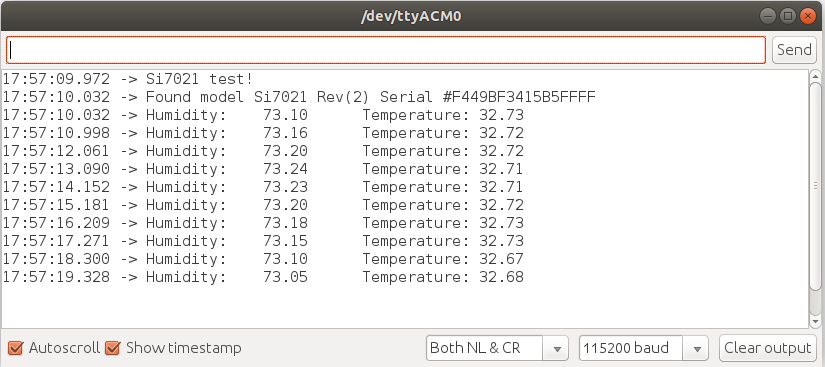
May I know which Si7021 module you are using and how are you wiring them up?Note: Do add
#define Serial SerialUSB to use the USB port as debug port.-
This reply was modified 6 years, 3 months ago by
LIM PHANG MOH.
June 22, 2020 at 10:15 PM #15498Participantthe breakout has no name. it looks like so:
(Sorry, I am not able to upload an image). It is a small tiny breakout board with i2c interface.
I tried it out with an Arduino mini pro and it works.-
This reply was modified 6 years, 3 months ago by
Christian Eugster.
-
This reply was modified 6 years, 3 months ago by
June 23, 2020 at 12:32 AM #15501KeymasterHow are you powering the board? Does the module has only 4-pin breakout (SDA, SCL, 3V3, GND) or it has the 5 pin type (has a VIN)?
You can upload your images elsewhere and put the link here.June 23, 2020 at 2:15 AM #15502Participant There are only four pins 3V3 GND SDA and SCL.June 23, 2020 at 10:50 PM #15505Participant
 June 23, 2020 at 10:50 PM #15506Participant
 June 24, 2020 at 1:04 PM #15507Keymaster
You need to solder the header pin to the Mini Ultra, putting them in ad-hoc doesn’t guarantee you any proper contact.
June 24, 2020 at 7:40 PM #15508ParticipantThat was it!? Thank you!
-
This reply was modified 6 years, 3 months ago by
-
AuthorPosts
- You must be logged in to reply to this topic.